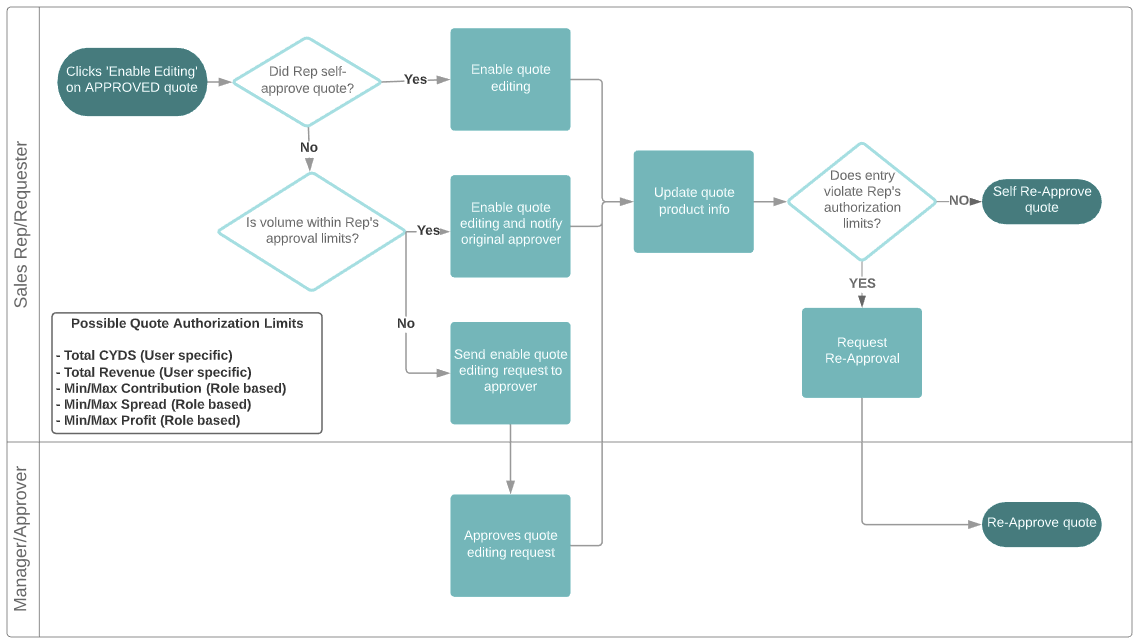
We’ve simplified the quote re-approval process to make it more intuitive. Here’s how the process works:
- To Re-Enable Editing
- If the quote’s volume is within your volume approval limit, editing will be immediately re-enabled
- If the quote’s volume is outside your volume approval limit, you will be given the opportunity to request that the quote be re-enabled for editing
- To Re-Approve
- Your approval limits may include restrictions related to CYDS, Revenue, Contribution, Spread, and/or Profit (depending on your company’s setup)
- If the quote is within your approval limits, you may re-approve the quote
- If the quote is outside your approval limits, you will be given the opportunity to request that the quote be re-approved by an authorized user
Re-Approval Process
Was this article helpful?
That’s Great!
Thank you for your feedback
Sorry! We couldn't be helpful
Thank you for your feedback
Feedback sent
We appreciate your effort and will try to fix the article