New Features
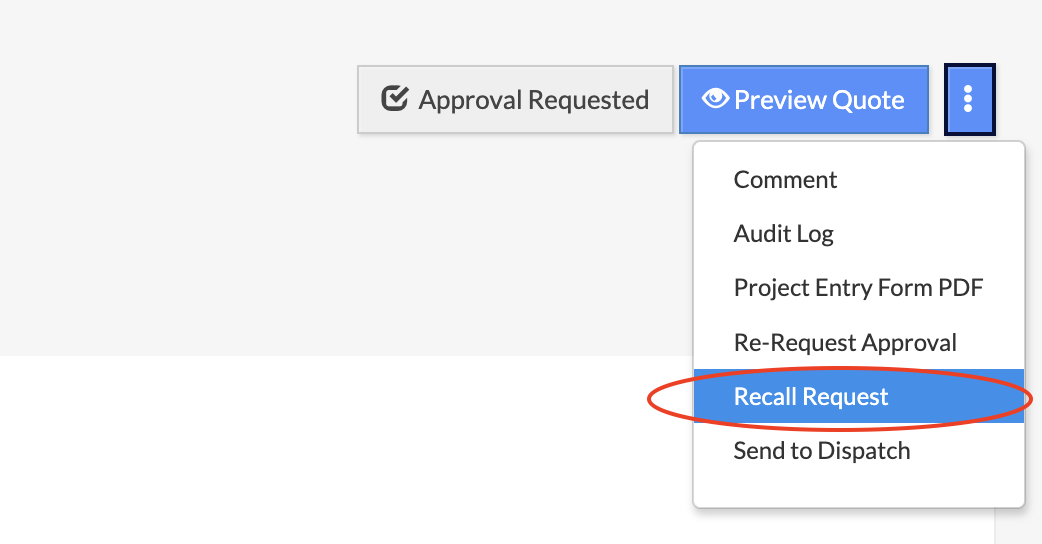
- Recall Approval Requests – Requestors can now recall approval requests before an approver views the quote, allowing them to make edits and resubmit. Once recalled, the quote returns to draft status and approvers receive a notification that no action is needed.
Improvements/Enhancements
- Sales Forecast Report - PDF Generation – Added a loading indicator when saving the Sales Forecast Report as PDF, providing clear visual feedback that the system is processing your request. This is especially helpful for larger reports such as Asphalt and Aggregates, which may take longer to generate.
- Prevent District Assignment Override on Customer Updates – Customer district assignments now remain intact when edited by users with limited district access. Previously, updating a customer's districts would unintentionally remove assignments to districts outside the user's permissions. The system now performs targeted updates, modifying only accessible districts while preserving existing assignments to restricted districts.
- Increased File Size Limit to 50MB – The maximum file size for attachments has been increased from 20MB to 50MB across all areas of the application, including Project Notes, Email Quote to Customer, and Forecast Notes.
- Improved Valuation Field Formatting – Valuation amounts now display with comma separators (e.g., 250,000) for easier readability on the Edit/Add Project page and Pipeline Index, with no decimal places shown.
- Removed Reset Password Option for SSO Users – The "Reset Password" option is now hidden for users who authenticate via Single Sign-On (SSO), preventing confusion since SSO users manage their passwords through their identity provider.
Bug Fixes
- Fixed Forecast Table Loading – The forecast table now automatically filters out inactive districts and sales staff, preventing loading failures caused by outdated filter preferences. When stored preferences conflict with current permissions or reference only inactive records, the system defaults to showing all active districts and displays a message confirming the update.
- Fixed Material Pricing on Aggregate and Asphalt Quote Copy – Resolved an issue where custom material prices were not copying when duplicating Aggregate and Asphalt quotes. The system now correctly preserves updated Asphalt Price and Aggregate Price values in the copied quote, instead of reverting to default prices.
- Fixed Comment Display Issue for Specific Customers – Comments now load and display properly for all customers when creating or copying quotes. The UI previously failed to show comments for customers with large data sizes, despite correct database storage.
- Fixed Bid Winner Display on Won/Lost Report – The Bid Winner column now correctly displays competitor names for lost projects and the company name for won projects. Previously, competitor names failed to appear for lost projects.
- Fixed Raw Material and Add-On Month/Year Selector – Resolved an issue where users were unable to change the month/year when updating raw material costs and addon costs. The selector remained stuck on the default month across all instances. The system now correctly allows users to navigate to any month/year to view and update cost data.
- Fixed 'Show Inactives' Filter on Sales Staff Page – The 'Show Inactives' toggle on the Settings - Sales Staff page failed to display inactive sales staff members when enabled. The filter now works correctly and shows all inactive staff as expected.
Was this article helpful?
That’s Great!
Thank you for your feedback
Sorry! We couldn't be helpful
Thank you for your feedback
Feedback sent
We appreciate your effort and will try to fix the article